Home
What the dashboard's home page shows and where it leads.
Home is today's summary. It opens after sign-in and answers four questions: who is coming, what is in progress, which cars are in the shop and what clients are saying.
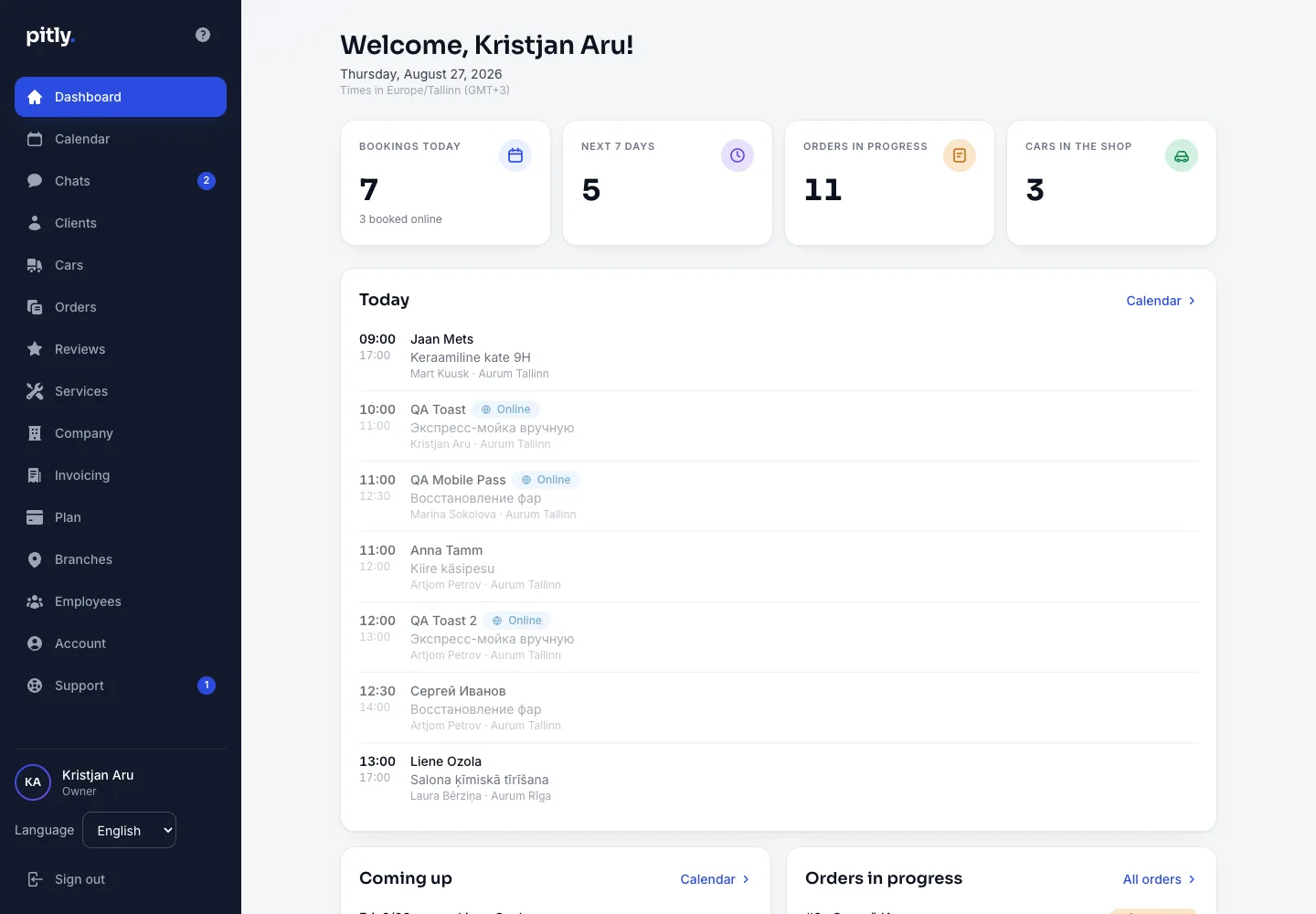
What is on the screen
- Stats — bookings today (and how many came online), the next 7 days, orders in progress, cars in the shop.
- Today and Upcoming bookings — time, client, car, service and assignee. A click opens the booking in the calendar.
- Orders in progress — orders in statuses from "Confirmed" to "Handed over". A click opens the order card.
- Cars in the shop — cars accepted and not yet handed over.
- Latest clients and Latest reviews — the company's average rating and fresh reviews.
Hints at the start
While the company is not set up, the home page shows the "Let's get your company ready" block with the unfinished onboarding steps instead of the summary. When everything is set up but there are no bookings yet — three hints: book a client, add a client, create an order.
The left menu
Calendar, Chats, Clients, Cars, Orders, Reviews, Services, Company, Invoice details, Plan, Branches, Employees, Account, Support. At the bottom — the interface language switch and sign-out. Badges on "Calendar", "Chats" and "Support" show new bookings, unread client messages and support replies.